
August 29th, 2019
Hey there, everybody,
How are you? I’m doing well, except that I just went through so much bureaucracy and mailing in order to get the PDF to get my Student Opus Card, that I decided to make it easier for myself in the future (and also for you students), because sometimes, I’m not very smart, and I don’t follow what the Concordia website wants out of me (to be COMPLETELY fair though, it doesn’t have images! How can I know which drop-down menu I should take?????).
Welcome to my weird tutorial!
What’s an Opus Card?
 If you live in the area of Montreal (or if you need to travel within Montreal or its surrounding cities) and you’re a student, you know all about the Opus Card, which is used mostly to store your public transportation tickets and passes. What’s nice is that if you are a full-time student or if you are 65 years old or older, you can get a nice price from the tickets and passes.
As far as I know, my student Opus Card needs to be updated every single year (which is frustrating, but… I guess that’s understandable, you don’t want people who aren’t students anymore take advantage of the student fees…), which is why near October 31rst, there’s always a big line-up.
There are three ways to obtain your Student Opus Card permission.
Online
What it is: You can take your picture yourself, in the comfort of your own home, and you can fill in the information to get your Opus Card mailed to you, which is pretty convenient.
What you need:
- 15$ (through VISA/MASTERCARD, etc.)
- Valid Student ID card
- valid Quebec mailing address
How to do this at Concordia:
- G
 o to your MyConcordia
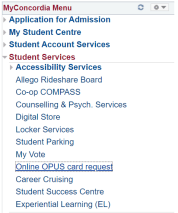
 - In the menu on the left,
- Click on Student Services which will drop down this image of the menu on the left.
- Then, click on Online Opus Card Request
- The middle part of the window will change to an orange-ish image which you will see here.
- Click on Order Now when you arrive on this image which says:
“Ready for the Reduced Fare?” (it’s basically on the image, at the bottom right)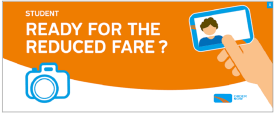
- Fill in the information they need you to go through
- Go through the payment process
- Wait till it arrives in the mail.
- Don’t forget to go to Bonaventure or other major places, in order to transfer the tickets from your old Opus Card to your new Opus Card once you received it!
STM Opus Tour
What it is: The STM photographer makes a tour of all the schools, in order to help print out a few Opus Cards for students.
What you need:
- 15$
- Government official ID card (which is not a student ID card)
- It can be a Health Insurance card, a Driver’s License, Passport, etc.
- A Filled in Application form
STM Photo Studio
What it is: Bonaventure and Berri-UQAM (I’m sure there are more places, though they mostly advertize Berri-UQAM so much more) have webcams and cameras and machines to print out Opus Cards, if you have everything that’s required of you, you can totally do that there and get your new Opus Card immediately.
What you need:
- 15$
- Official Photo ID Card (which is not a Student ID card)
- Health Insurance Card
- Driver’s License
- Passport
- etc.
- Filled in Opus Application form
- School Attestation
- To get the school attestation from Concordia (according to the Concordia page, but this time, with images, for dummies like me):
- Go to Myconcordia
- Go to My Student Center
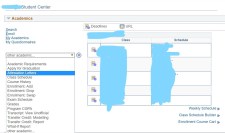 Take the drop-down menu as seen here, find Attestation Letters (this is where I had trouble, because I couldn’t find this drop-down menu today, no matter where I went, for some reason).
- Select the Language and Academic Career (this means: Graduate/Undergraduate (which one are you at the moment?))
- Take the Opus Attestation which is in Instantaneous PDF Letter and fill in the proper Term.
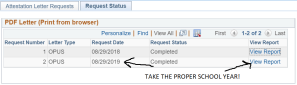 Be careful when you are at the View Report step, TAKE THE PROPER SCHOOL TERM (I printed out the wrong one today, sadly).
- Note: this year, they said that you don’t actually need to have the paper version, they can take the virtual version as well (I’m guessing maybe they got cases of people faking their papers through Photoshop or something? Dang).
- To get the school attestation from Concordia (according to the Concordia page, but this time, with images, for dummies like me):
All right!
Let’s hope that next year, I will be better (if anything anyways, I know I’ll have this here, haha)?
Have a great beginning of your Fall semester!
PV
 Tell Me More About TESL
You must be logged in to post a comment.